










Make studying chill

Study smarter. Save hours.

Your lectures go in. Flashcards, quizzes and answers come out.

  • Skip 10+ hours of studying
  • Free forever plan. No credit card. Ready in 30 seconds.

“Saved my finals”

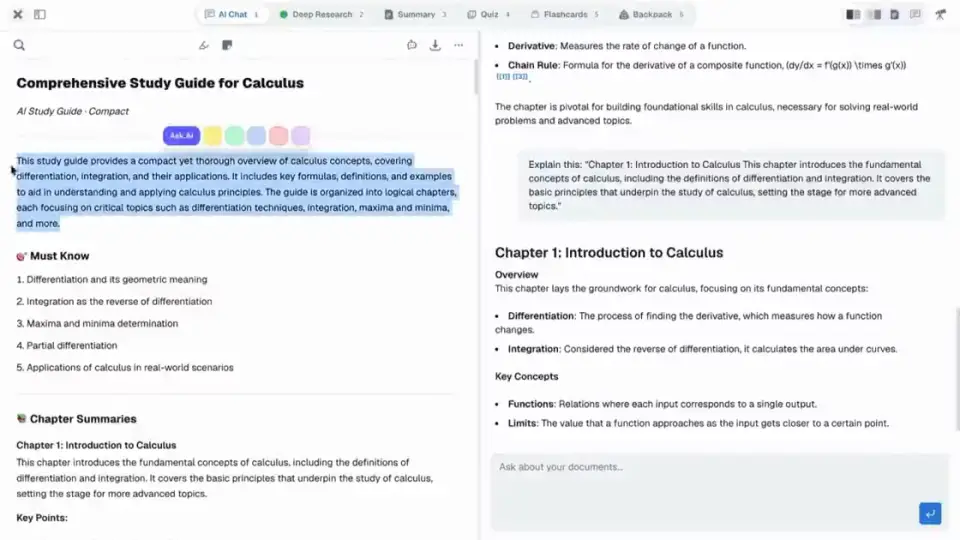
Studycamp workspace with lectures, AI chat, and planner

For students who want better grades in less time

  • Harvard University
  • Stanford University
  • Massachusetts Institute of Technology
  • Yale University
  • Princeton University
  • Cornell University
  • University of Oxford
  • ETH Zürich
  • University of Amsterdam

So, why Studycamp?

The problem: five apps, five logins and notes everywhere. You lose an hour before you study a minute.

The fix: one workspace. Upload once, ask questions, test yourself and plan your week in the same place.

Everything for your exam, in one place

Stop jumping between five apps to study one chapter.

Without Studycamp

  • Notes scattered across five apps
  • Re-reading instead of testing yourself
  • Making flashcards by hand
  • Deadlines living in your head
  • No idea what you still do not know

With Studycamp

  • Upload your notes and slides once
  • Ask questions and get answers from your own material
  • Turn any file into flashcards in one click
  • Take quizzes that show what you still do not know
  • See every deadline next to your study plan

watch this first

Got 3 minutes? See how it works.

Subtitles in 45 languages. Turn them on with the CC button.

Open the tutorial page

but that's not all

Everything Studycamp can do

Docs, Study AI, Backpack, handy tools, and customization. Each one gets its own page so you can see what Studycamp does.

Organize

Upload & Storage

Drop PDFs into a workspace or pull them from Storage. Studycamp preps them for AI study tools.

  • Drag and drop into any workspace
  • Storage for files you reuse across classes
  • Clear status on every file
  • Powers chat, summaries, quizzes, and flashcards

Ask

AI Chat

Ask questions about your uploaded files. Answers cite the passages they came from.

  • Answers grounded in your files
  • Citations that jump to the source
  • Send highlighted text or images from the PDF
  • Streaming replies

Study

Study Sessions

A focused environment for all your tools. Pick the ones you like and study without leaving the screen.

  • One focused screen for every tool
  • Pick the tools you like, with a number key for each
  • Add tools to a session later
  • Your files and AI side by side

Remember

Flashcards

Turn your files into a deck. Flip, shuffle, pick up where you left off.

  • Front/back cards from your files
  • Flip, shuffle, track progress
  • Deck history per session
  • Progress saved when you switch tools

Test yourself

Quiz

Multiple-choice practice from your files, with explanations after each answer.

  • Questions from your uploaded files
  • Explanation after each answer
  • Score and review when you finish
  • Quiz history per workspace session

Capture

Live Lecture

Hit record in class. The transcript and your notes write themselves while the lecturer talks.

  • Live transcript and live notes, side by side
  • Notes in your language, even if the lecture isn't
  • Knows which class is on from your calendar
  • Every lecture lands in the course's Lectures folder

from real students

What students say

Best study app I've ever used
Stopped me from failing
Saved my finals
The tools I actually needed
The quiz showed me what I actually didn't know
Worth the switch
Study sessions are wild
Wish I found this sooner

Studycamp vs the rest

Studycamp

Studycamp

Study tools

AI chat on your uploaded files

Study sessions on your material

Flashcards and quizzes from your files

PDF reader inside the study flow

Notes, calendar, to-dos, and kanban

Workspaces per class or project

Free plan you can actually use

the science bit

Built on how memory actually works

You answer first, then check. That is active recall, the fastest way to make something stick. Studycamp brings back what you are weak on right before you would forget it.

Do not read it five times. Get tested on it once.

Pricing

From your first lecture to your final exam

Start free with 3 workspaces and 1 GB. Upgrade when one app is not enough.

Save 17% with yearly

Essentials for studying

Free

Build the habit

Get organized and try Studycamp free

$0/forever
  • Up to 3 workspaces
  • 1 GB storage
  • 1,500 AI credits a month
  • AI chat, summaries and quizzes
  • Calendar and task management
  • 60 shared minutes for audio, video and live lectures a month

The AI study workspace

Pro Student

Recommended

Everything you need to stay ahead all semester

For students who want one app all semester

Previously $17.99$14.99/month$3 off

Exam season price until Feb 14. Then $17.99/mo.

or $149/year ($12.42/mo). Save 17%

Everything in Free, and:

  • Unlimited workspaces
  • 100 GB storage*
  • Your entire semester in one place
  • AI tutor on your course material
  • Smart study planner
  • AI research with citations
  • Premium AI models
  • More audio and video transcription minutes
  • Priority support
  • Unlimited live lecture notes
  • Podcast recaps of your material

*Subject to fair use.

AI credits

Credits power chat, summaries, quizzes and flashcards. Free includes 1,500 per month. Pro includes 100,000. A typical chat uses about 50. Deep research and podcasts are Pro only. Audio, video and live lectures share a separate transcription allowance: 60 minutes a month on Free, more on Pro.

Cancel Pro any time. You keep Pro until the end of your billing period.

Your questions

How it works, what it costs, and what happens to your files.

How does Studycamp AI use my data?

Upload PDFs to a workspace and Studycamp indexes them for study tools. AI Chat searches your files and answers with citations to the exact passages, so you can check the source instead of taking a guess on faith. Summaries, quizzes, flashcards, and research run on the same material, so you are not re-uploading anything to get a different tool.

Your uploads stay in your account. We do not sell your content or use it to train public models. See pricing for AI credit limits on Free and Pro.

Is this just flashcards with an AI label slapped on it?

No. The flashcard and quiz engine is built around spaced repetition, so cards you know well show up less and cards you are shaky on come back sooner, right before you would have forgotten them.

Chat and quizzes also lean on active recall: you answer first, then check, instead of passively rereading a PDF and feeling like you learned something. That combination is what actually moves retention, not just a nicer-looking notes app.

What are workspaces, study sessions, and storage?

A workspace holds your course files for one class or project. Upload PDFs there, or add files you already keep in Storage so you do not upload twice.

A study session is where you actually work inside that workspace. Your PDF sits beside AI Chat, and everything saves: your page, chat history, and any quiz or deck in progress. Press 1 through 6 to swap tools without losing your place, or hit Cmd+K to open Telescope and jump straight to any file, note, or tool by name.

Does this work for my major?

Yes. Studycamp does not care what you are studying. Med school anatomy, a coding bootcamp repo full of PDFs, gen-ed readings, law case files, it is all just files to upload and material to chat with.

The tools stay the same across every field: chat with citations, flashcards, quizzes, notes, and a calendar. What changes is what you put in, not what the app can do.

Is Studycamp free?

Yes. The Free plan includes up to 3 workspaces, 1 GB storage, chat with your PDFs, summaries, quizzes, calendar, and tasks. No credit card required.

Upgrade to Pro when you want unlimited workspaces, more storage, and higher AI limits. Details on pricing.

How do upload and storage work?

Drag PDFs into any workspace, or pick files from Storage when you already uploaded them once. Studycamp processes each file in the background. When it is ready, AI Chat and the other study tools can use it.

Free includes 1 GB total. Pro includes 100 GB. If you hit the limit on Free, free up space or upgrade before uploading more. Nothing you already uploaded gets deleted.

What payment methods do you accept?

We use Stripe for checkout. Major credit and debit cards are supported. Apple Pay and Google Pay may appear at checkout depending on your device and region.

Pro is $14.99 a month or $149 a year. See pricing for details.

Can I cancel Pro any time?

Yes. Cancel from your account settings whenever you want. You keep Pro access until the end of your billing period, then your account moves back to Free.

Your workspaces, files, and notes stay put.

Do you offer student discounts?

Pro Student is already priced for students. Through exam season (until February 14, 2027) Pro is $14.99 a month instead of $17.99. Yearly is $149, which works out to about $12.42 a month.

Not sure yet? Compare plans on pricing or start free.

Why not just use ChatGPT?

Studycamp isn't just a chatbot. Your AI lives inside the same workspace as your course material, notes, quizzes, flashcards, tasks, videos, and study tools. You can move from understanding something to practicing it without rebuilding context or switching apps.

Why not just use Quizlet?

Quizlet is great for studying with flashcards and practice. Studycamp goes beyond the review step, bringing your course material, AI, notes, research, documents, tasks, focus tools, and collaboration into the same workspace.

Still have questions? Start free and see for yourself.

Ready to make studying chill?

Better studying starts this week

Start studying free

Free forever plan. No credit card. Ready in 30 seconds.